TBW / ENTERPRISE VOICE AI
Voice AI for Enterprise
Build AI voice agents that listen, understand, act, and connect callers to the right people.
Explore voice agents for customer support, appointments, service desks and controlled business workflows—integrated with supported phone systems, knowledge, APIs and enterprise applications.
Book a Voice AI ConsultationExplore the Architecture
After-hours coverage · Human handoff · Enterprise integrations · Multilingual options · Permission-aware knowledge · Security by design
What Voice AI Can Do for Your Business
After-hours customer service
Handle routine requests outside business hours while escalating complex cases to staff.
Faster response
Answer common questions and status inquiries without making every caller wait in a queue.
Controlled automation
Retrieve permitted information and complete approved tasks through scoped tools and APIs.
Human escalation
Transfer callers when requested, when confidence is low, or when a workflow requires a person.
Multilingual service
Select and test language-specific speech and AI components for the intended audience.
Enterprise integration
Connect supported phone, CRM, ticketing, scheduling and knowledge systems.
Voice AI Use Cases
These are design patterns, not customer case studies.
Customer service & reception
Directory and schedule integration; hand off when routing is uncertain.
Appointment scheduling
Calendar and identity checks; hand off for conflicts or exceptions.
IT & HR service desk
Identity and knowledge access; hand off for privileged requests.
Case & order status
CRM or ticket lookup; hand off when identity or records disagree.
Outbound notifications
Campaign controls and consent records; hand off on objection or request.
Multilingual front door
Language detection and routing; hand off on low confidence.
How Enterprise Voice AI Works
Calls or app sessions reach a voice gateway. Speech is interpreted by an agent that may consult permission-aware knowledge or approved business tools, then returns a spoken response or transfers to a person. Identity, consent, encryption, authorization, redaction, logging and monitoring surround the flow.
Enterprise Integrations
CRM and ticketing
Look up cases and record redacted outcomes.
Calendars and scheduling
Check availability and confirm before booking.
Microsoft 365 and identity
Apply identity and authorization before data access.
Contact center and PBX
Route to queues with appropriate context.
Payment handling
Move callers to a secure payment channel; keep card details out of recordings and transcripts.
Data warehouse and reporting
Aggregate permitted outcomes without sensitive call content.
Explore enterprise integration and MCP and API integration.
Secure Voice AI by Design
Controls are selected and tested for each customer environment; no architecture eliminates all risk.
Identity & authentication
Verify callers where needed and authenticate services before accessing business data.
Data protection
Encrypt supported paths, redact sensitive values, minimize collection and define retention.
AI security
Constrain tools, validate inputs and outputs, and test injection and data-leakage paths.
Least privilege
Give each agent only scoped API permissions and approved actions.
Human oversight
Define escalation triggers and approvals for consequential actions.
Audit & monitoring
Capture permitted conversation and tool events for review, quality and incident response.
Privacy & consent
Disclose the AI interaction and apply recording, consent and retention rules per deployment.
Deployment Options
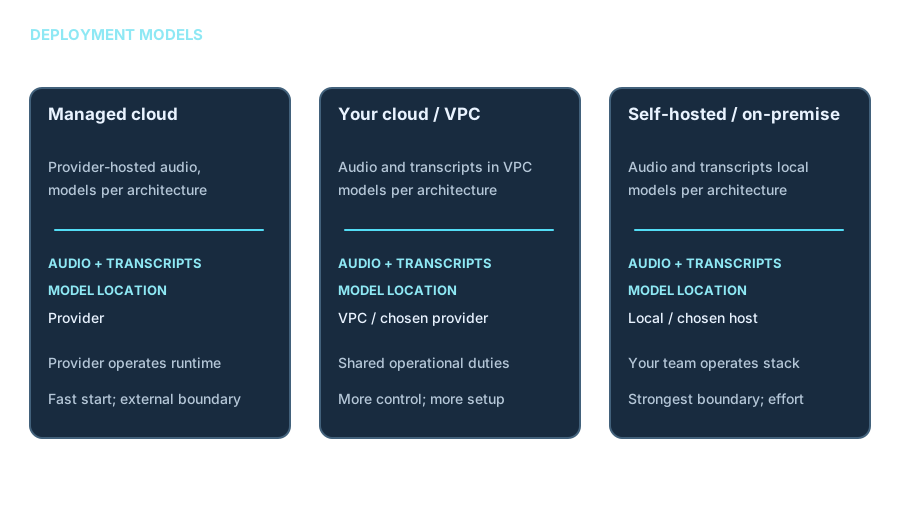
Managed cloud
Provider operates the voice stack; audio, transcripts and models may run in provider environments. Confirm retention, region and controls.
Your cloud account or VPC
Selected components run in your account; shared operations and network boundaries require explicit ownership.
Self-hosted or on-premise
Chosen transport, speech or model components run locally; strongest infrastructure control, with greater operations effort.
Related: private AI, local AI and AI infrastructure.
Voice AI Technology Ecosystem
Technology options for architecture discussion—not partnerships or a claim that TBW has deployed each product. Selection depends on requirements, licensing, regional availability, security controls and integration needs.
Telephony and transport
Twilio, Telnyx, Vonage, SIP providers, PBX, contact centers, WebRTC
Speech recognition
Deepgram, Google Cloud, Microsoft Azure, Amazon, AssemblyAI
Language models
Hosted frontier models or open-weight models
Speech synthesis
ElevenLabs, Cartesia, Rime, Deepgram, Azure, Google, Inworld
Orchestration
ElevenLabs Agents, Vapi, Retell, LiveKit Agents, Pipecat, Twilio ConversationRelay
Evaluation and monitoring
Call simulations, trace review, permitted quality sampling and operational alerts
See consulting and training and resources.
How TBW Delivers Voice AI
Stages and timing depend on scope; this is a delivery method, not a fixed 90-day promise.
Discover
Bound the call type, volume, customer journey, phone system, data and security needs.
Design
Set conversation flows, architecture, identity, controls, escalation and evaluation criteria.
Prototype
Build a test-number agent with representative permitted knowledge and sandbox tools.
Integrate
Connect approved telephony, CRM, ticketing, calendars and business APIs.
Secure
Implement authorization, consent, redaction, logging and security tests.
Test
Measure quality, latency, tool execution, failures and human handoff against agreed criteria.
Pilot
Run a controlled pilot with defined users, measures and stop conditions.
Operate
Monitor, review, tune, handle incidents and manage provider or prompt changes.
TBW Voice AI Services
Voice Readiness Assessment
Call types, telephony, systems, consent and privacy review. For teams scoping voice. Deliverables: findings, target architecture and roadmap.
Proof of Concept
One call type on test numbers, sandbox tools and evaluation set. For feasibility decisions. Deliverables: prototype, results and go/no-go.
Production Build
Telephony, orchestration, tools, RAG, redaction and monitoring. For a selected production workflow. Deliverables: running system, runbooks and test suite.
Provider and Integration Engineering
Selection and neutral-adapter integration. For multi-provider requirements. Deliverables: integration, failover plan and documentation.
Voice Security Review
Consent, redaction, authentication, injection and leakage tests. For risk owners. Deliverables: prioritized findings and fixes.
Managed Operations and Training
Monitoring, tuning, quality review and team enablement. For operating teams. Deliverables: reports, training and handover.
Experience a Voice AI Conversation
Illustrative text only. No microphone, recording, live agent or production system is connected to this page.
Customer: “Can you check the status of my support case?”
Voice AI: “I can help with that. Before I retrieve the case, I need to verify the required information.”
Listen → Understand → Verify → Search an authorized system → Respond → Escalate if needed
Read another illustrative exchange
Illustrative conversation
These are design patterns, not customer case studies. Static text only; no audio is recorded or played.
Agent: I’m an AI assistant. I can check your case status or connect you to a person. How can I help?
Caller: Can you check case 284?
Agent: I’ll check that now. [Authorized case lookup; identifier validated]
Agent: The case is waiting for a team review. Would you like me to connect you?
Caller: Yes.
Agent: I’ll connect you. [Human receives a concise, redacted summary where the transfer method supports it.]
Technical Details
Open a topic for the engineering explanation, original diagrams and implementation considerations.
Design considerations
Solution
Latency
People notice delays in speech far more than in text, so every pipeline stage counts.
Turn-taking
The agent must detect when a caller has finished and stop speaking when interrupted.
Telephony reality
Noisy audio, accents, phone codecs, transfers and dropped calls change the design.
Data and consent
Audio, transcripts and recordings add permission, retention and privacy decisions.
A good voice agent is a telephony, speech, language and integration project, not only a prompt.
Detailed reference architecture
Reference architecture
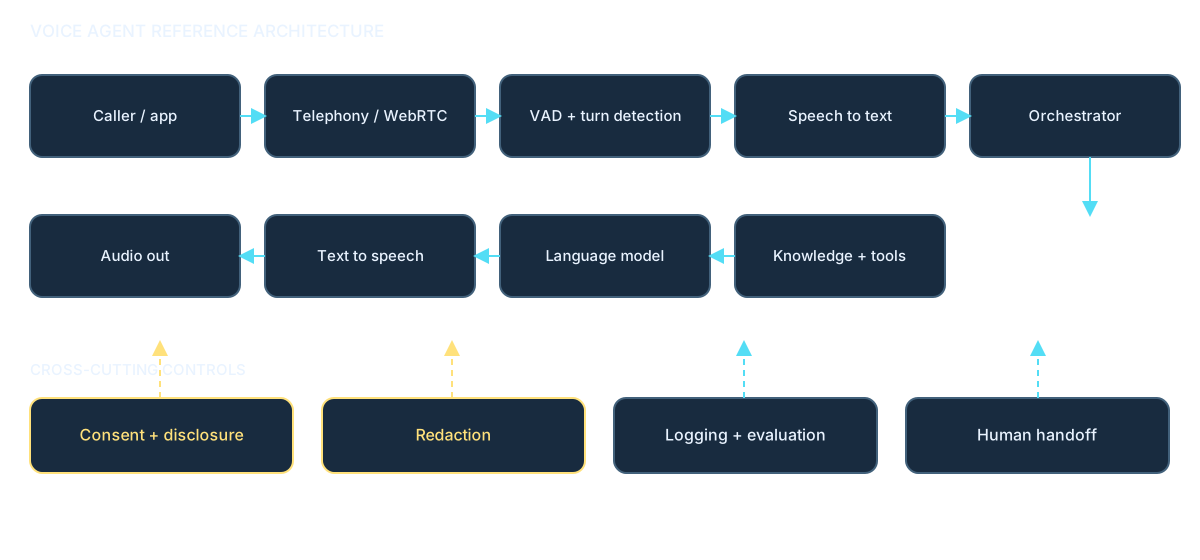
Illustrative design: choose a stage to see the decisions TBW would make. The supporting lanes apply across the flow.
Caller / app
Choose supported entry points and how a caller starts a session.
What TBW decides at each stage
- Caller / app: Choose supported entry points and how a caller starts a session.
- Telephony or WebRTC ingress: Map numbers, codecs, encryption and failover at the network boundary.
- Voice activity and turn detection: Decide when someone has finished and how fast the agent stops when interrupted.
- Speech to text: Check recognition for names, numbers, accents and noisy connections.
- Orchestrator: Decide which tools may run, with what permissions, and when to hand off.
- Knowledge retrieval and tools: Ground answers in authorized sources and constrain consequential actions.
- Language model: Select a model and prompt policy appropriate to the task and latency.
- Text to speech: Choose voice, streaming behavior and pronunciation requirements.
- Audio out: Monitor first-audio delay, delivery quality and interruption behavior.
- Consent and disclosure: Notice, explicit start and recording permissions.
- Redaction: Remove sensitive values such as card numbers before transcripts, logs or analytics.
- Logging and evaluation: Capture only needed diagnostics with retention controls.
- Human handoff: Define the trigger, destination and summary shared with the person.
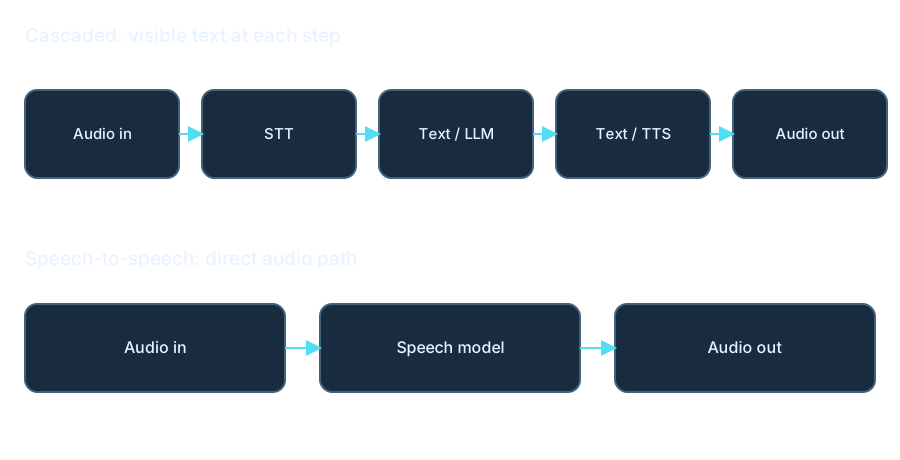
Cascaded versus speech-to-speech
Cascaded or speech-to-speech?
A cascaded pipeline connects speech-to-text, a language model and text-to-speech. Each component can be swapped, text inspected and controls inserted. Speech-to-speech takes audio in and returns audio; it can reduce latency and preserve tone, but provides less visibility and component choice.
We choose per use case; many enterprise deployments favor the cascaded design for control and observability, and speech-to-speech is considered where lowest latency matters most.
| Criterion | Cascaded | Speech-to-speech |
|---|---|---|
| Latency | Multiple stages to tune | Potentially lower |
| Component flexibility | Swap STT, model and TTS | Usually more coupled |
| Observability and auditing | Inspect intermediate text | Less intermediate visibility |
| Tone and emotion | Synthesized output | May preserve more nuance |
| Typical fit | Control-led workflows | Low-latency conversational use |
Latency and turn-taking
The latency budget
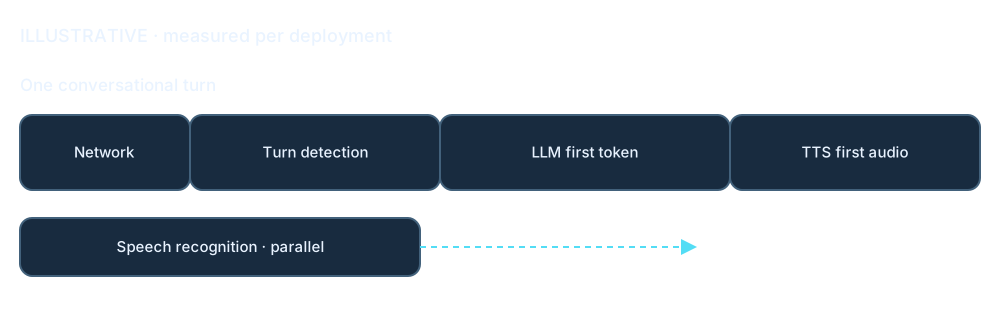
Illustrative budget, measured per deployment. Most of the delay comes from turn-taking and the language model’s first token, so we tune those first.
Consent and user controls
Consent-led interaction design
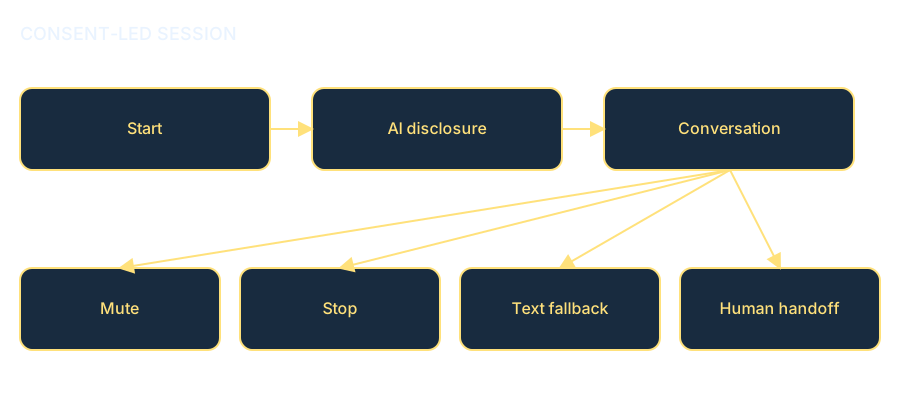
- The user explicitly starts a session and hears clear AI disclosure.
- Mute, Stop and text fallback remain available.
- Offer easy handoff to a person.
- Record only with notice and consent where required.
Speech, models and knowledge
Knowledge hub
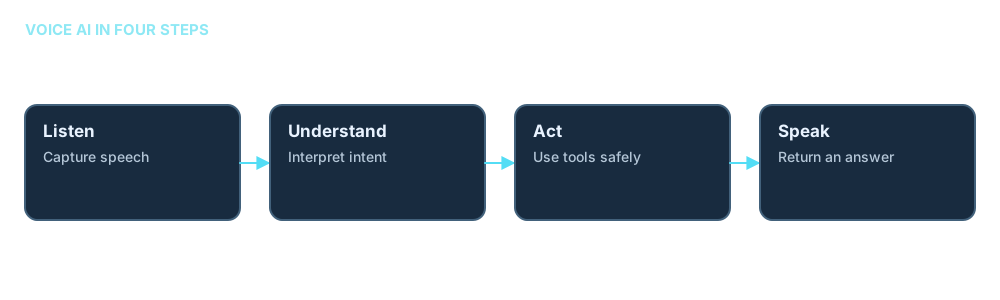
A voice agent listens to a caller, interprets their request, may look up authorized information or call a tool, then speaks an answer. It can also route the call to a person.
The flow is only as dependable as its audio transport, permissions, source information and fallback design. A fluent reply is not proof that a requested action succeeded.
Speech recognition (STT)
Turns speech into text; names and numbers can be misheard.
Activity and turn detection
Detects speech and pauses; mistakes can cause interruptions or awkward silence.
Model and orchestration
Plans replies and applies policy; vague rules can cause wrong actions.
Tools and knowledge
Uses RAG and APIs; stale sources or broad permissions can mislead.
Speech synthesis (TTS)
Turns text into audio; pronunciation and delay affect clarity.
Telephony and transport
Moves audio and call events; codecs and dropped connections matter.
SIP, SBC, WebRTC and telephony
Telephony primer
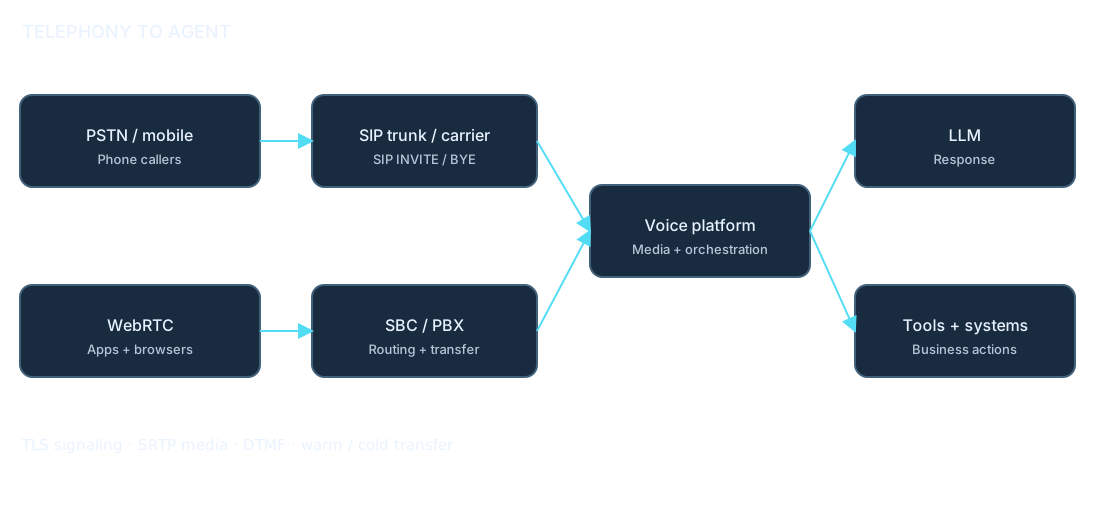
PSTN numbers connect ordinary phone callers. A SIP trunk routes calls between a carrier and a PBX or platform; SIP INVITE starts and BYE ends a session. An SBC protects the boundary; a PBX routes internal calls. WebRTC carries browser or app calls. Codecs encode speech; DTMF carries keypad tones.
A warm transfer prepares the human with context before connecting; a cold transfer connects directly. SIP REFER is one cold-transfer mechanism and requires trunk support. TLS protects signaling and SRTP protects media where supported and configured.
Technical glossary
Glossary
STT / ASR
Speech-to-text or automatic speech recognition: converts audio to words.
TTS
Text-to-speech: synthesizes spoken audio from text.
VAD
Voice activity detection: detects when speech is present.
Endpointing / turn detection
Decides when the caller has finished a turn.
Barge-in
Caller interrupts the agent while it is speaking.
Time to first audio
Delay until the agent starts its audible reply.
WER
Word error rate: recognition errors relative to reference words.
SIP
Session Initiation Protocol: sets up and ends real-time calls.
SIP trunk
Connection carrying SIP calls between a provider and platform.
SBC
Session border controller: manages and protects call boundaries.
WebRTC
Browser and app technology for real-time audio/video.
DTMF
Keypad tones used for menu choices and digits.
IVR
Interactive voice response: automated phone menu or dialog.
Warm transfer
Human gets context or a spoken message before connection.
ConversationRelay-style media streaming
Carrier-mediated live audio or text exchanged with an application.
Speech-to-speech
Model takes audio and returns audio without separate visible text stages.
Planning and approach selection
How to start
Is voice the right channel?
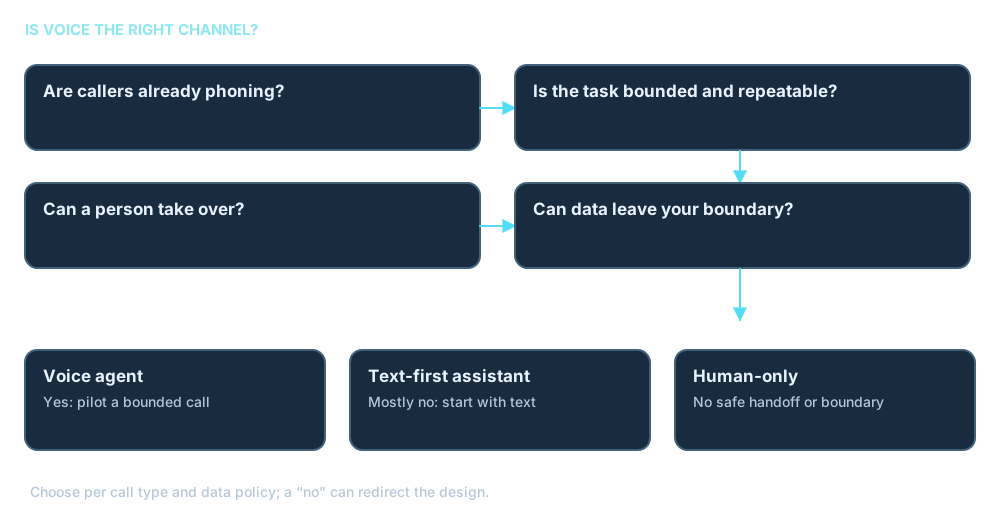
Are callers already phoning? Is the task bounded and repeatable? Can a person take over? Is the data permitted to leave the chosen boundary? If mostly no, begin with a chat or text-first assistant, or keep the process human-led.
Choose an approach
Managed platform
Fits a quick start. Provider operates more components; assess control and data boundary; lower initial effort.
Composable hosted framework
Fits component choice and a stronger boundary in your environment; more engineering and operations.
Custom bridge
Fits specific phone and model requirements; most control, highest integration effort.
Pilot planning sequence
Typical path; depends on scope.
- Pick one bounded call type and collect permitted real call samples.
- Map systems, permissions, consent and handoff rules.
- Prototype on test numbers with an evaluation set.
- Pilot with a small group, measure, then expand.
What we need from you
- A business owner and one call type.
- Permitted call recordings or scripts.
- Provider, numbers, PBX or contact-center details.
- Systems the agent must reach.
- Security and IT contact.
- A definition of a failed call and its cost.
Integration landscape
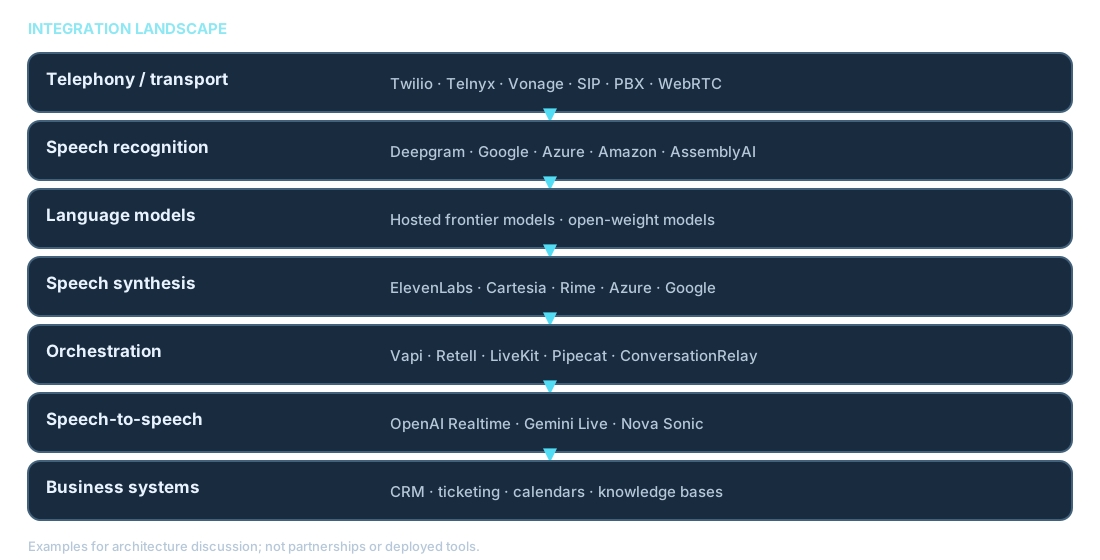
Integration landscape
Provider names are examples for architecture discussion, not partnerships or an assertion that any tool is deployed. We select providers per requirement.
| Layer | Examples |
|---|---|
| Telephony and transport | Twilio, Telnyx, Vonage, SIP providers, PBX, contact centers, WebRTC |
| Speech recognition | Deepgram, Google Cloud, Microsoft Azure, Amazon, AssemblyAI |
| Language models | Hosted frontier models or open-weight models |
| Speech synthesis | ElevenLabs, Cartesia, Rime, Deepgram, Azure, Google, Inworld |
| Orchestration | ElevenLabs Agents, Vapi, Retell, LiveKit Agents, Pipecat, Twilio ConversationRelay |
| Speech-to-speech | OpenAI Realtime, Google Gemini Live, Amazon Nova Sonic |
| Business systems | CRM, ticketing, calendars, Microsoft 365, databases, knowledge bases |
Example provider integration
ElevenLabs Agents integration
An example platform architecture, not a deployed integration or partnership. Agent configuration can include voice and language, a document-backed knowledge base with RAG, personalization and authentication settings. Client tools run in an app or browser; server tools call your APIs; MCP tools connect tool servers; system tools include call transfer and ending a call.
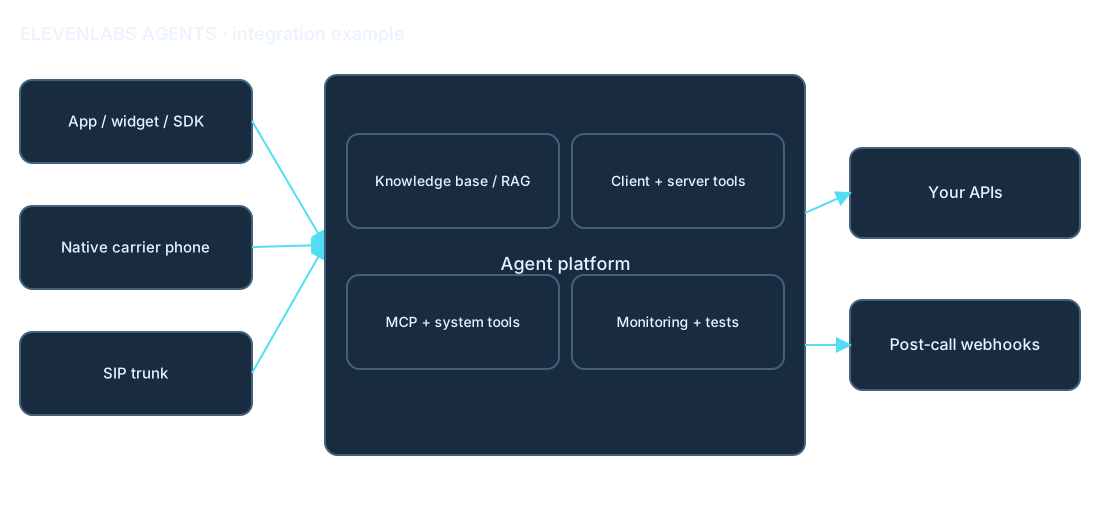
Documented entry points include a web widget, React, Swift, Kotlin and React Native SDKs, native Twilio integration, SIP trunking, batch outbound, custom-client WebSocket API and WhatsApp. A SIP trunk can connect an existing PBX or provider via SIP INVITE, with TCP or TLS signaling depending on setup; compatibility and call routing need validation.
Human transfer may target a number or SIP URI. A spoken warm-transfer message to the human is supported with the native Twilio integration; SIP REFER transfers are cold and require the trunk to allow REFER. Confirm transfer behavior and trunk support at design time. Conversation analysis, testing, experiments, versions and post-call webhooks can support operations. Agent configuration can be version-controlled across development and production. Capabilities change; we confirm current details against the provider’s transfer documentation at design time.
Integration patterns
Integration patterns
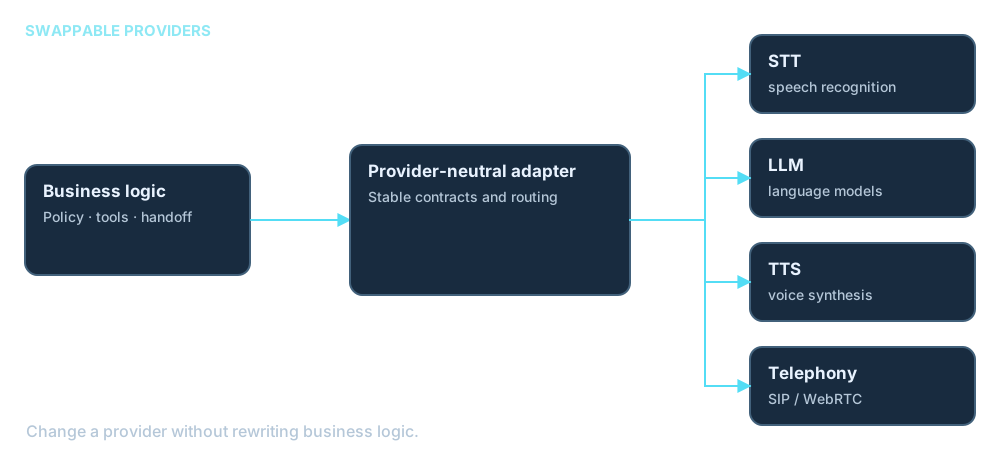
A provider-neutral adapter layer lets speech, model and voice providers be swapped without rewriting business logic.
Platform-managed
The platform operates STT, model and TTS; faster to start, less control of internals.
Composable and self-hosted
LiveKit Agents or Pipecat can connect chosen providers; more control and a stronger data boundary, with more engineering.
Custom bridge
Telephony media streamed over WebSocket into your services; maximum specificity and highest effort.
Telephony integration options
Telephony integration options
| What it connects | Typical use | Things to check |
|---|---|---|
| Inbound SIP trunk | Connect existing number or PBX to a platform | Codecs, TLS/SRTP, REFER support, failover |
| Native carrier integration | Connect a supported carrier directly | Number porting, caller ID, transfer features |
| PBX/contact-center handoff | Escalate to human queues | Context passing, warm/cold method, capacity |
| Outbound campaigns | Place approved outbound calls | Consent, caller ID, concurrency, jurisdiction |
| Browser/mobile WebRTC or SDK | App-based calling | Permission, transport encryption, fallback |
| Messaging channels | Companion text interactions | Identity, consent, channel parity |
Tools, webhooks and MCP
Tools, webhooks and MCP
Server tools call REST or webhook endpoints for lookups and bookings; MCP servers expose shared tool catalogs; system tools handle transfer and hang-up. A tool result is checked before the agent speaks as if a task is complete.
- Least-privilege scopes per tool and schema-validated arguments.
- Confirm consequential actions and use idempotency keys.
- Set timeouts, fallbacks and brief spoken filler while a tool runs.
- Authenticate and sign webhooks with replay protection.
- Send only redacted content in post-call CRM or analytics events.
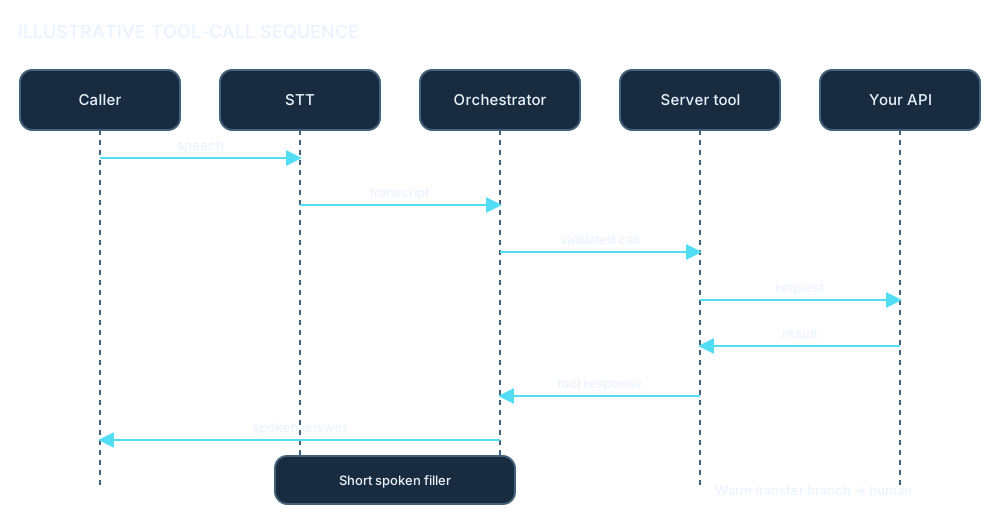
Permission-aware voice RAG
Knowledge and RAG for voice
Spoken answers should be short and grounded in permission-aware retrieval. Cite the source in a call summary or follow-up message rather than reading long citations aloud. See retrieval-augmented generation.
Detailed security and privacy controls
Security and privacy by design
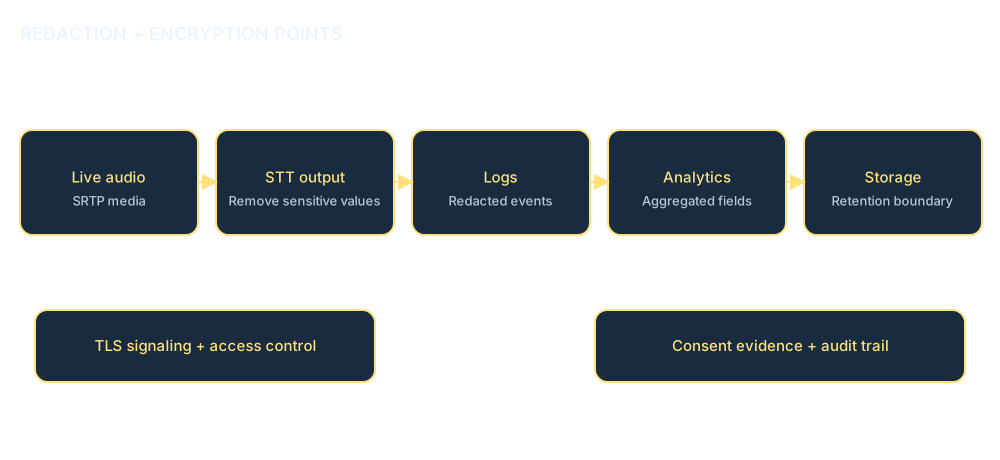
- Use TLS for signaling and SRTP for media where supported and configured.
- Redact sensitive values in live audio paths, STT output, logs and analytics before storage or onward sharing.
- Keep only needed data for a defined retention period, with least-privilege access and audit logs.
- Do not authenticate by voice alone; synthetic voices make additional checks necessary.
- Test prompt injection, social engineering and data leakage.
- Keep consent evidence with the call record; recording notice and outbound rules vary by jurisdiction and must be checked per deployment.
Evaluation and monitoring
Evaluation and monitoring
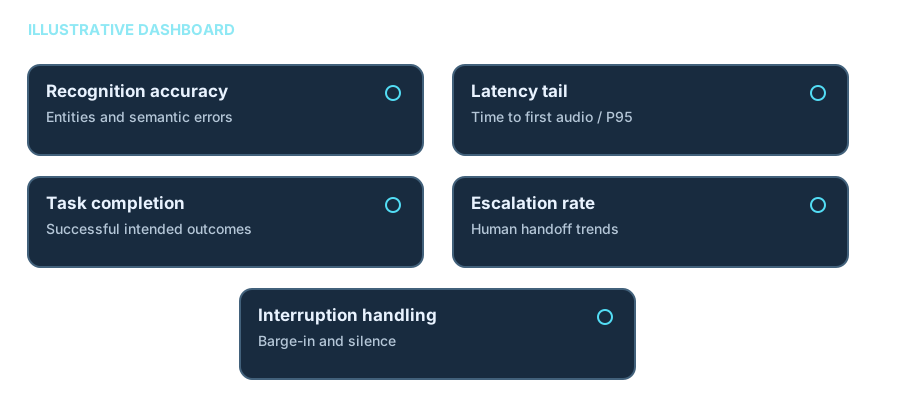
Illustrative dashboard. Measure recognition with semantic word error rate and key-entity accuracy (names, numbers, dates); latency with first audio and P95 tail, not averages alone; conversations with interruption and silence handling; outcomes with task completion, tool success and escalation; safety with compliance checks and sensitive-data echo.
Test simulated calls across accents and noise before launch. Regression-test every prompt, model or provider change and sample permitted production calls for review. Targets are agreed with each client; these are not reported scores.
Production operations
Production operations
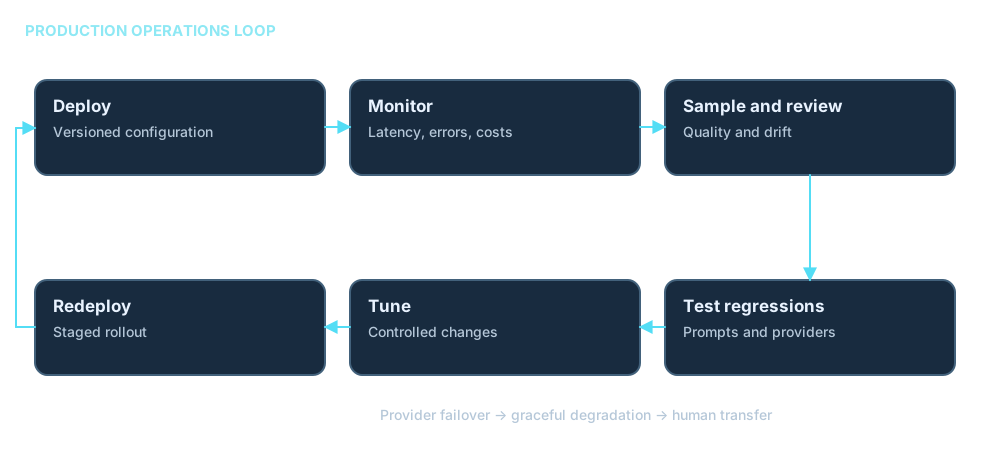
Release control
Version prompts and configuration; stage rollouts and compare variants.
Resilience
Plan provider failover and graceful degradation to simpler voice or human transfer.
Capacity and cost
Load-test concurrency and track cost per call.
Quality and change
Alert on P95 latency, errors and tool failures; review permitted transcripts for drift and upstream changes.
Engagement diagram and handover
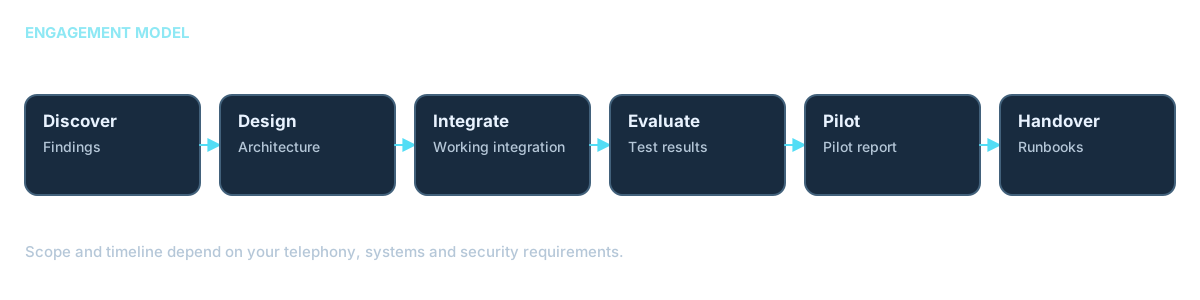
Engagement model
Discover (findings) → Design (architecture) → Integrate (connected prototype) → Evaluate (test report) → Pilot (monitored release) → Handover (runbook). Scope and timeline depend on your telephony, systems and security requirements.
Frequently asked questions
Is a microphone activated on this page?
No. This page does not request microphone permission or capture audio. Any future voice experience must request permission and offer Start, Mute, Stop and a text fallback.
Cascaded or speech-to-speech?
We choose per use case. Cascaded designs offer component choice and visibility; speech-to-speech may reduce latency and preserve tone.
Which providers do you work with?
We select providers per requirement and design for provider swap. Named providers are examples, not partnerships.
Can it connect to our existing phone system?
Often, through supported SIP, carrier or PBX integration; codecs, routing and transfer support must be checked.
How do you handle transfers to a person?
We define triggers, destination and shared context. Warm versus cold transfer depends on the selected carrier and platform.
How is caller data protected?
We design for consent, limited retention, encryption, least privilege and redaction before transcripts, logs or analytics.
How do you measure quality?
We test recognition, time to first audio and P95 latency, interruptions, task success, escalations and safety against agreed targets.
Can it work in multiple languages?
It depends on the chosen providers and is tested separately for each language.
What is the first step?
Choose one bounded call type and review its phone system, permissions, data and handoff needs.
What is an enterprise Voice AI agent?
A voice agent handles defined conversations through approved phone or app channels, uses authorized knowledge and tools, and hands off to a person when needed.
Can it connect to Salesforce, ServiceNow, Microsoft 365 or custom applications?
Potentially, through supported APIs and identity controls. The available actions depend on your systems, permissions and integration design.
Can it use our internal knowledge and perform business actions?
It can retrieve permitted knowledge and invoke explicitly approved, scoped tools. Sensitive or consequential actions need validation and human approval where appropriate.
Can it run in our cloud or private environment?
Some components can, depending on the selected providers, deployment support, data-residency needs and operational requirements.
How is Voice AI monitored after deployment?
Monitor permitted quality, latency, errors, tool events and escalations; review traces and incidents within agreed privacy and retention rules.
Can TBW support a proof of concept or pilot?
A bounded proof of concept or pilot can be planned around one use case, test systems, clear success criteria and a defined human-handoff path.
Ready to Build Your Voice AI Solution?
Whether you are modernizing customer service, automating appointments, connecting a service desk or planning a secure agent, TBW can help evaluate the architecture and implementation approach.